

FAQs
Got questions?
We’ve got answers!


Rise Product Offerings & Benefits
Learn more about Frogfoot Rise and benefits it offers.
What is Frogfoot Rise?
Frogfoot Rise is a prepaid cost-effective solution that is designed to target a market that has not previously had the means to connect to fibre Internet services, or alternatively have basic connectivity requirements and prefer to be on a prepaid service and not contract bound.
This fibre infrastructure and Wi-Fi only equipment is installed in homes within Frogfoot Rise coverage areas prior to orders being taken for the product, enabling the user to buy prepaid services once installed.
What subscription periods does Frogfoot Rise offer?
Subscribers can choose from subscription periods of either 7-, 14- or 30- days.
What speeds can I choose from?
Frogfoot Rise offers Asymmetrical speeds from 50Mbps up to 300Mbps.
Port Booster: What can I do with the extra ports?
You can plug in up to 4 devices directly to your Frogfoot Rise Wi-Fi box using a network cable. This is great for devices like a computer, laptop, Smart TV or gaming console when you want a faster and more stable connection.
Registration & Promotional Offering
Learn more about the Registration and Promotional Offering
Why does the Frogfoot Rise team need my personal details?
Frogfoot must adhere to laws which require all Subscribers for electronic communication services to undergo RICA verification.
What will be required upon registration?
During the registration process, Subscribers be required to:
- Registered customers must be 18 years or older
- Provide a valid mobile number to enable One-Time-Pin (OTP) access to Rise online portal.
- Provide a photograph of their South African Identity Document – where a South African Identity Document is not available, a photograph of their passport – with the passport expiry date clearly visible will be accepted. Note that drivers licenses will not be accepted.
- Provide a photograph of themselves holding their Identity Document or passport as verification.
- Consent to allow Frogfoot to share their personal information with Internet service providers strictly for RICA compliance and provision of the Rise service.
- Choose a preferred Internet Service Provider to recharge after the free trial.
Frogfoot installed the Fibre to my home, what’s next?
Once Frogfoot Rise contractors complete the installation, the residents of the respective property can access the internet for free during a trial period. The trial is not available for new tenants in properties where the trial period has already been used by previous tenants or where the device has been replaced with a new device.
You and your family can just sit back and enjoy great connectivity by watching your favourite shows, streaming music, or just chatting with your WhatsApp friends.
Your selected Internet Service Provider (“ISP”) will be in contact before the free trial period expires to arrange for continued activation of service and recharge the beyond the trial.
My free trial period is ending what are the next steps?
- Your selected ISP will contact you before the end of the free trial.
- The ISP will explain the next steps to you and tell you about the Rise products available to you.
- Once you have decided on the speed and term, your selected ISP will place a Rise order with Frogfoot.
- You will receive a payment link via SMS or Email to make payment of your Rise Prepaid service.
- Should you subscribe for a Rise prepaid service during the trial period, the paid service term shall commence once the free trail period has lapsed.
- Once payment is successful, your ISP will activate your service and you can continue to enjoy unlimited affordable connectivity.
Why do I not qualify for a free trial?
If you are a new tenant or user and there is an existing Frogfoot Rise device installed, you will not be eligible for the free trial service. Instead, you will need to follow these steps:
- Register by visiting www.rise.frogfoot.co.za
- Choose your desired speed, prepaid term, and preferred ISP.
- Make a payment for the service using either a Debit card, Credit card, or a 1ForYou voucher to start enjoying affordable prepaid fibre with unlimited data.
Recharge and Payments
Covers tracking orders, shipping times, international shipping, and pre-order arrival times.
How and where do I recharge?
You can recharge by logging into your profile via the Frogfoot Rise website www.rise.frogfoot.co.za and selecting Recharge option. You can recharge with a 1Voucher or with debit/credit card payment.
Alternatively, you can place a recharge order with your selected ISP.
Can I change my Frogfoot Rise service?
Yes. You can change your Frogfoot Rise package or subscription period when it is time to recharge.
Please contact your current ISP to make the change.
What Payment Methods will be accepted?
Only payment in South African Rand (ZAR) via debit card, credit card or 1Voucher (powered by Flash) will be accepted.
You will have the option to choose between a “once-off” or “recurring subscription” payment when paying with a credit card or debit card
How does the recurring subscription payment work?
You can choose to subscribe for a recurring payment plan with durations of 3,6, or 12 months. Your recurring payment will match the original recharge subscription in terms of speed 50/25Mbps and duration (7,14,30 days), and it will continue to be automatically deducted from your selected account for the chosen 3, 6, 12 month period.
For example: If your package is a 50/25 Mbps plan for 7 days at R75 (including VAT), and you’ve opted for a recurring payment plan of 3 months, a deduction of R75 will occur two days before the start date of your new 3 month contract.
When will my recurring subscription payment be deducted?
Your recurring subscription payment will be automatically deducted from your account 2 days before the new service start date. It is important to ensure that there are enough funds available in your account to cover this payment. If the payment is not successful after three attempts, and your subscription is out of contract, your service will be suspended until you make the necessary payment to reactivate it.
My recurring payment failed what now?
Your recurring subscription will be automatically cancelled after 3rd failed attempts, and you will have to reinstate your recurring subscription payment.
You can log into your profile, under Recharge select “Subscribe” to reinstate your recurring payment or alternatively select “Once Off” to pay for service once.
Can I stop my recurring payment?
You will be able to cancel your recurring subscription payment at any given time within the registered subscribe profile, under subscription details. As Frogfoot is acting as a collection agent on behalf of the Subscriber’s chosen ISP, the onus will be on the Subscriber to cancel the re-occurring subscription on the Subscriber’s selected credit card or debit card. Please note there is a strict no-refund policy applicable to the Service. This means that you will not be able to cancel your recurring payment and claim a refund once payment has been made and the Service period commences.
Refunds and Exchanges
Explains return policies, how to return items, and the process for broken or damaged items.
Can I transfer funds to another device or family member?
Unfortunately, no. Funds cannot be transferred -whether due to an incorrect recharge, relocating to a new home, or to a family member using a different ONT (Optical Network Terminal).
Can I change from my current ISP to another ISP?
Yes, you will need to notify your current ISP of your intention to terminate the service once your term expires or by selecting “Change ISP” within your profile on Frogfoot Rise website.
If I do not recharge, does it mean my service are automatically cancelled?
No. If you do not recharge, your service will be placed on hold.
You can get back online by recharging within 90 days. After 90 days, you may need to reapply for the service.
Is the device installed in my home mine to take with me when I move?
No, the device belongs to Frogfoot and must stay at the property where it was originally installed. If your new residence is within the Frogfoot Rise coverage area and doesn’t have an existing device, please inform us, and one of our Frogfoot Rise Ambassadors can arrange the installation of a new device at your new property.
Troubleshooting and Support
Learn more about Frogfoot Rise and benefits it offers.
What are the limitations of Frogfoot Rise services?
- The Frogfoot Rise Prepaid service is only available in pre-installed homes within the Frogfoot Rise coverage areas.
- Frogfoot Rise Prepaid is Wi-Fi only service.
- LAN ports will be enabled based on product bundle or VAS service.
- This service is not recommended for homes that are bigger than 100m2.
- The number of smart devices connected to the Frogfoot Rise Prepaid service is based on the product bundle and Value Added Services selected.
Need assistance with Wi-Fi access?
After successfully registering for the free trial period, you will receive Wi-Fi details and password credentials via SMS or email.
When you switch to your preferred ISP with paid services, the password will change once again, and you will be notified of the new password through SMS or email, sent to the registered person.
If your service is in a “Suspended” state, you can still log onto the Wi-Fi using a generic password, which will be “p@ssword.” This will direct you to the Rise landing page where you can recharge your service.
The SSID of your Wi-Fi will be in the format of i.e. Frog(lily)_Rise#A1B2C3 with the password being xxxxxx.
For your convenience, the Wi-Fi credentials will also be accessible within your Profile.
I need help, who do I contact?
You can contact your Internet Service Provider (ISP) or Frogfoot Rise, https://rise.frogfoot.co.za/contact-us/ OR WhatsApp 0664941400.
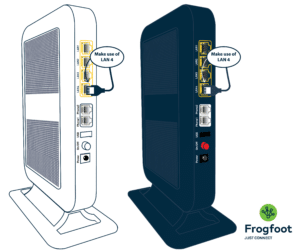
Where are the VAS Booster ports located?
The Ports are on the side of your Frogfoot Rise Wi-fi box.
Please see the image below to help you find them.
What type of cable do I need?
You need an Ethernet cable. It is also sometimes called a network cable or LAN cable.
You can use this cable to plug in devices like a computer, laptop, Smart TV or gaming console for a more stable internet connection.
How do I connect to the port?
- Locate the LAN Port: Find the ethernet port on your router, modem, or switch (often labeled “LAN” and sometimes colored yellow).
- Find the LAN port on your Frogfoot Rise Wi-Fi box.
- Plug one end of the Ethernet cable into the LAN port on your Frogfoot device.
Always start with LAN 4. If you need to connect additional devices, use the ports in this order: LAN 4 → LAN 3 → LAN 2 - Plug the other side into your device, like your laptop, Smart TV or gaming console.
- Make sure the cable is pushed in properly. You may hear or feel a small click.
- Once connected, your device should have a more stable internet connection.
Can someone help me connect a device to the port?
Yes. If you need help connecting your device to the port, please contact Frogfoot Rise support.

Still have questions?
We're here to help. Get in touch.